A SaaS company can rank for hundreds of keywords, attract thousands of organic visitors, and still generate very few customers from search.
The problem often starts with keyword selection.
A typical workflow looks like this: enter a product category into Ahrefs or Semrush, export related terms, filter by volume and difficulty, and build a content calendar. That reveals what people search for, but not necessarily which searches are worth competing for.
Someone looking for a free spreadsheet and someone comparing software vendors might search for similar topics. Their needs, buying intentions, and value to your business can be very different.
Effective SaaS keyword research identifies demand your product can realistically capture and convert into qualified signups, demos, and customers.
This guide explains how to discover relevant searches, evaluate the results, prioritize opportunities, and connect them to an SEO plan. We'll refer to our free Google Keyword Research Template for organizing keyword groups and comparing their potential.
Start With Your SaaS Product and Ideal Customer
Before opening a keyword tool, decide what makes a search relevant to your business.
A keyword can show strong buying intent and still attract the wrong customer. Someone searching for "enterprise procurement software" may be ready to purchase, but a product designed for small-business purchase approvals probably cannot serve all their requirements.
Evaluate potential themes against three questions:
- Buyer fit: Does the query suggest someone in your ideal customer profile (ICP)?
- Problem fit: Does your product solve the underlying problem well?
- Buying context: Is the searcher learning a process, struggling with a recurring workflow, or evaluating software?
Define Your Core Keyword Themes
Use product positioning, customer research, sales conversations, and competitor analysis to establish starting themes.
These are research directions, not validated keywords. Product terminology often differs from buyer language: a team might describe "configurable multi-step approval routing," while customers search for "how to automate purchase approvals."
Review won and lost deals, support requests, onboarding feedback, and product reviews. Look for recurring problems, purchasing triggers, and requirements that influenced decisions. Use that evidence to decide which themes deserve keyword expansion instead of letting a tool-generated list set your strategy.
Find Keywords That Reflect Real Buying Needs
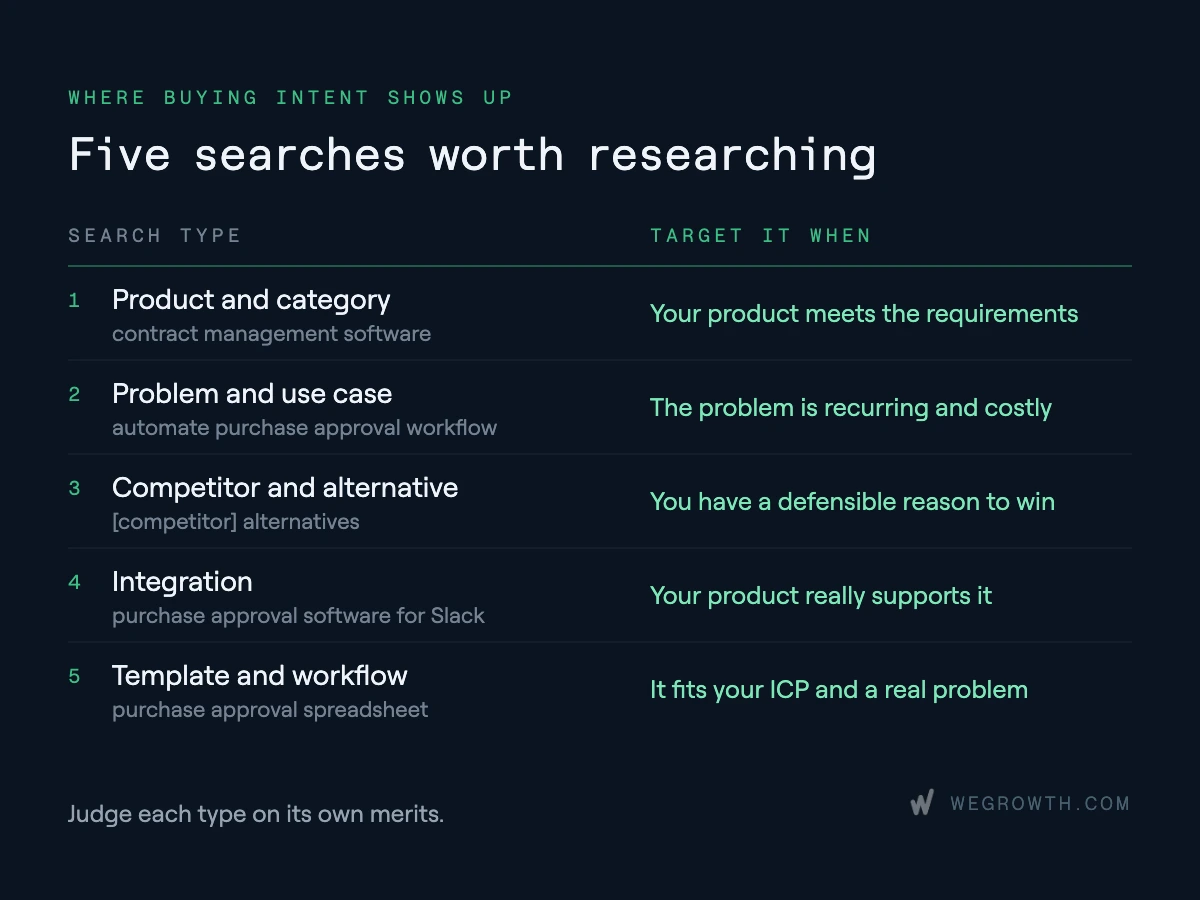
Five types of searches are particularly useful in SaaS research. Each can attract a different audience and should be evaluated on its own merits.
1. Product and Category Keywords
Searches such as "contract management software" or "purchase approval platform" suggest that buyers recognize a software category. They can be commercially attractive, but broad terms often have results dominated by established vendors and software directories.
Investigate narrower variations specifying company size, industry, or a requirement. "Purchase approval software for small businesses" may align more closely with an SMB product than "procurement software." That doesn't make it automatically easier to rank for: the actual results still determine feasibility.
Decision: Favor category terms where your product meets the buyer's requirements and you have a credible reason to compete.
2. Problem and Use-Case Keywords
Searches such as "automate purchase approval workflow" or "track approval requests across departments" describe a task rather than software.
A one-time question may have limited commercial value. A recurring workflow causing delays, errors, or manual work can signal a more consequential problem. The important test is whether the searcher might realistically need software, rather than instructions or a simple workaround.
Decision: Investigate recurring, costly problems, then validate what type of solution the results indicate people want.
3. Competitor and Alternative Keywords
Queries like "[Competitor] alternatives," "[Competitor A] vs [Competitor B]," and "[Competitor] pricing" can reach buyers who know the category and are evaluating options.
But competitor-related does not always mean ready to switch. The strongest opportunities are tied to genuine differences: an integration your product supports, a pricing constraint, missing functionality, or a different target customer. A credible comparison page should substantiate those differences rather than automatically declare your product the winner.
Decision: Target competitor searches where you can explain a defensible reason to choose your product.
4. Integration Keywords
A search for "purchase approval software for Slack" may indicate a specific requirement that influences vendor selection. But the searcher might want native integration, instructions for building an automation, or a third-party connector.
Decision: Research integrations your product actually supports and match the page to the expected workflow.
5. Template and Workflow Keywords
A purchase approval spreadsheet might attract companies still handling approvals manually. Some could eventually need automation; others simply want a free resource.
Decision: Evaluate template searches on ICP fit and their connection to a recurring problem, not on the assumption that every download becomes a product lead.
Where to Discover and Validate Keyword Opportunities
Use different sources for different questions. No single tool can establish search demand, customer fit, and conversion potential on its own.
Google Search Console: What Can You Improve Already?
In Google Search Console, compare queries with the pages receiving impressions and clicks. Look for relevant terms where a page appears but doesn't fully address the searcher's requirements.
For example, a general product page may receive impressions for an industry-specific workflow it barely discusses. That could justify expanding the page or creating a dedicated landing page, depending on the SERP.
Existing visibility is evidence worth investigating. A targeted update may be more efficient than publishing a new page. Interpret click-through rate alongside position, intent, and search features; low CTR alone doesn't diagnose the problem.
Google Keyword Planner: How Much Demand Is Reported?
Google Keyword Planner provides keyword suggestions, estimated monthly searches, and advertising data. Keep geography, language, and date range consistent when comparing terms.
Check whether demand changes by market or season before comparing opportunities. A query tied to annual budgeting, compliance deadlines, or a particular region may look attractive in an aggregated dataset but matter little to your actual buyers. Record the market behind each estimate. If you're combining exports from different tools or dates, normalize the settings first; otherwise small differences in reported volume can reflect methodology rather than a meaningful difference in demand.
Volume is an estimate, not a forecast of organic visits. Google's averages can include close variants. CPC describes paid-search conditions, not organic difficulty or customer value. In specialized B2B markets, don't discard a term solely because reported volume is low if customer evidence supports demand.
Ahrefs or Semrush: Where Do Competitors Have Visibility?
Analyze businesses serving similar customers and inspect their category, comparison, integration, and use-case pages. Identify searches your site doesn't address.
A keyword gap isn't necessarily an opportunity. If another vendor ranks for an integration your product lacks, it may indicate a product gap instead. Filter competitor terms through your ICP and product capabilities.
Google Ads: Which Queries Already Attract Qualified Buyers?
If you run Search Ads, review search terms associated with qualified demos, activated users, opportunities, or customers—not only clicks.
Converting paid queries are useful evidence, although organic placements, messaging, and behavior differ. Use them to inform research, then validate organic feasibility independently.
Analyze the SERP Before Assigning Priority
Keyword modifiers provide clues about intent; the search engine results page (SERP) shows what users are currently being offered. Inspect important queries in the target country before deciding what to publish.
1. Identify What the Searcher Expects
Intent is often described as informational, commercial, transactional, or navigational. In SaaS, comparison searches are also worth separating because they frequently represent active vendor evaluation.
A query like "PTO tracking" could mean software, a template, or instructions. Check whether the leading results are product pages, comparison sites, directories, guides, or resources.
If Google predominantly surfaces product landing pages, an introductory blog may be a poor match. If users expect independent comparisons, a generic sales page may be equally unsuitable.
Mixed results deserve special attention. If software pages and free templates both rank, don't immediately create two competing URLs. First identify which audience matters most to your business and what your existing pages already cover. You might serve the dominant need with one page and link to a secondary resource, or build distinct assets if the SERPs and buyer journeys are genuinely different. The choice should follow search evidence, not a rule that every intent needs a separate page.
Decision: Choose the page format only after understanding the dominant task behind the query.
2. Look Beyond the Keyword Difficulty Score
Review who ranks, what their pages cover, and whether they satisfy specific audience requirements. Major vendors with established category pages may be difficult to displace, but a narrower use case could offer a distinctive angle.
For instance, an SMB-focused product might serve a "purchase approval workflow for small teams" query better than an enterprise procurement page. However, if current results already answer that need well, specificity alone is not a competitive advantage.
Ranking feasibility is also relative to your own website. A competitor might win because it has a stronger domain, but your page may still compete if you already have relevant topic coverage, internal links, and evidence of visibility for related queries. Conversely, a seemingly low-difficulty term may require documentation, original comparisons, or product capabilities you cannot credibly provide. Judge the work required against the opportunity, not against one numerical score.
Decision: Name the gap your page would close. If you can't, reassess the opportunity.
3. Compare Results for Similar Keywords
"Purchase approval software" and "purchase approval tool" may be variations of one need. "Purchase approval spreadsheet template" likely represents another.
Compare ranking URLs and formats. Consistent overlap can support one primary page; substantially different results may justify separate assets. This prevents unnecessary pages targeting essentially the same intent.
4. Consider Organic Click Opportunity
Reported search volume doesn't equal available website visits. Paid placements, directories, and AI-generated answers can affect clicks. A simple factual query may be satisfied on the results page, while a serious software comparison often requires more investigation.
This is especially relevant when comparing an informational keyword with a product-evaluation keyword. The first may have more searches but fewer compelling click opportunities; the second may attract fewer people who need more detailed information. Where you already have similar pages, use Search Console performance to inform expectations rather than applying the same assumed click rate to every query.
Decision: Ask not only whether the keyword has demand, but whether your proposed page gives the searcher a reason to visit.
Group Keywords Into Search Opportunities
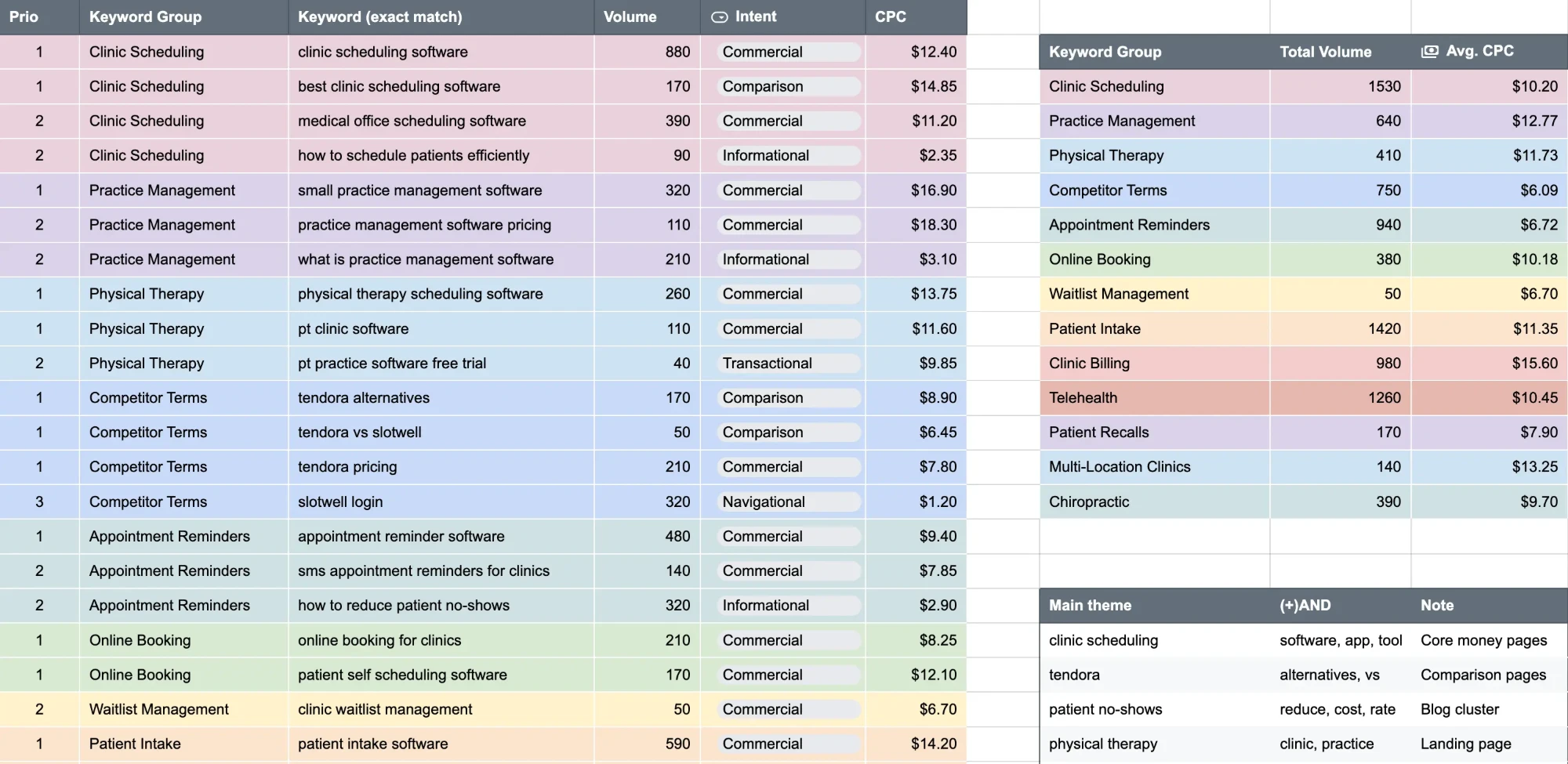
After validating candidates, organize them by the need they represent, not merely by shared words.
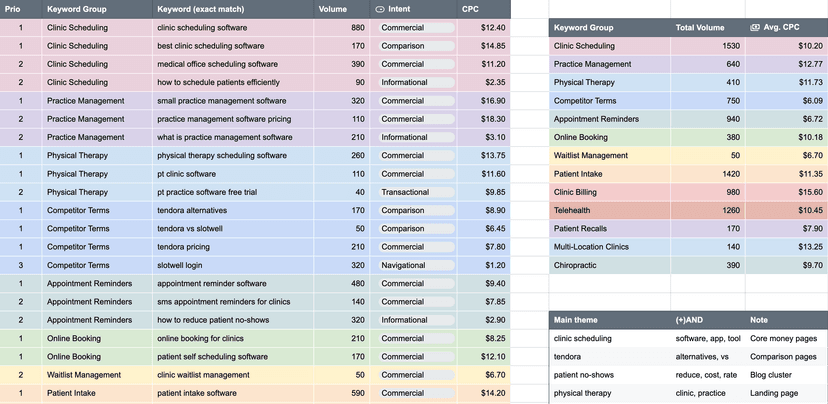
Our Google Keyword Research Template includes Prio, Keyword Group, Keyword (exact match), Volume, Intent, and CPC, plus group summaries showing Total Volume and Avg. CPC.
These fields help compare opportunities, but their interpretation matters more than the number of rows completed.
Build Groups Around Pages, Not Phrases
"Purchase approval software," "purchase request approval system," and "software for managing purchase approvals" may share enough intent for one product page.
"Purchase approval spreadsheet template" may need a separate resource because the immediate task is different. Confirm the distinction through the SERP instead of assuming every wording variation needs a URL.
Expand Themes With Meaningful Modifiers
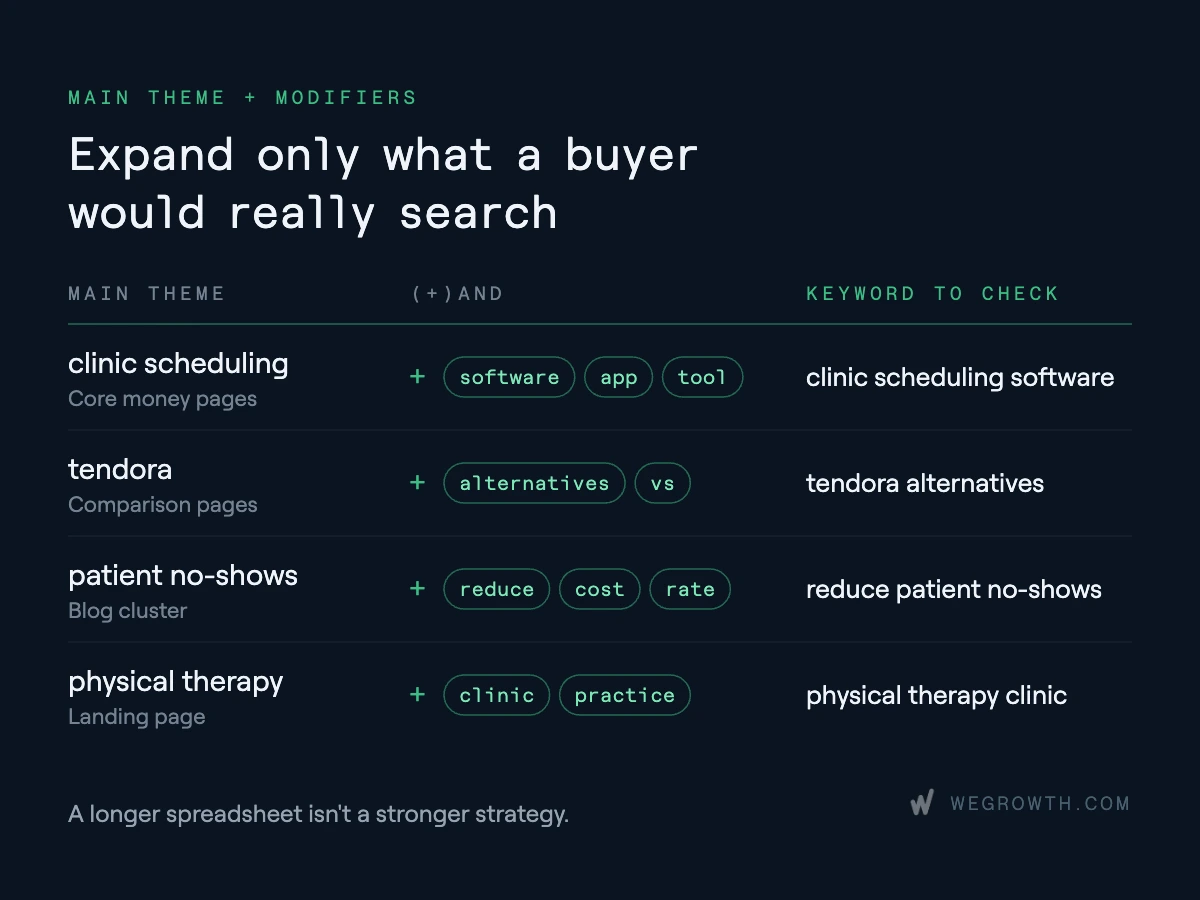
The template's Main Theme, (+)AND, and Note area helps explore requirements such as industries, team sizes, integrations, alternatives, and workflows. Only expand combinations connected to plausible buyer requirements. A longer spreadsheet isn't a stronger strategy.
Interpret Group Metrics Carefully
Group totals help compare themes, but adding closely related keyword volumes can overstate unique demand: tools may combine close variants, and the same person may perform several similar searches.
Average CPC is also not a proxy for customer value. Use the summary to select groups for deeper analysis, not to forecast exact organic traffic or revenue.
Prioritize Keywords: A Practical SaaS Example
Consider a fictional SaaS product for small businesses that automates purchase requests, supports Slack approvals, and replaces spreadsheet workflows. It does not provide enterprise procurement management.
Imagine it uncovers these candidate keywords:
These are illustrative judgments, not findings from client research or verified keyword-volume data.
The broad "procurement software" term may attract enterprise buyers who need supplier management and sourcing functionality this product doesn't offer. The small-business term appears more relevant, but would only earn high priority if its SERP and ranking feasibility checked out.
The Slack query is interesting because the product can satisfy a specific workflow. Yet it could turn out that people predominantly want technical tutorials rather than ready-made software. In that case, the target asset and priority would change.
The template query may bring potential future buyers, but it also attracts people who only want a spreadsheet. Evaluate it as a useful resource with a plausible product-discovery path, not as equivalent to a software-category landing page.
Finally, a competitor-alternatives query could become the highest priority if the competing product lacks functionality buyers repeatedly request and your product solves that gap.
A useful research note should state both the decision and its condition: "High priority if the SERP favors software pages," or "Revisit if the product launches native integration." This makes the rationale auditable. When several marketers review the sheet months later, they can tell whether the opportunity has changed or whether the original decision was simply based on an unsupported impression.
The point isn't to assign a permanent label. It's to make a reasoned decision, record what evidence is missing, and update priorities when that evidence arrives.
Assign Priorities Using Commercial Potential and Feasibility
Evaluate promising groups against four factors:
- Business fit: Does the query describe a problem you solve for an ICP customer?
- Buying intent: Is the searcher evaluating software or primarily looking for information?
- Ranking feasibility: Can your website compete with the existing results?
- Economic potential: Could the acquisition value justify the cost of creating and maintaining the page?
These factors needn't carry equal weight. A young SaaS with limited authority may favor a narrow, attainable workflow term; an established vendor may reasonably invest in a competitive category page.
Use the template's 1–3 priority scale to make the outcome explicit:
Estimate Potential Customer Value
For the most promising groups, build a directional business case using realistic traffic assumptions and your own funnel rates.
Product-led SaaS:
Estimated organic visits × Visitor-to-signup rate × Signup-to-paid rate = Estimated new paying customers
Sales-led SaaS:
Estimated organic visits × Visitor-to-demo rate × Demo-to-opportunity rate × Opportunity win rate = Estimated new customers
Add activation, qualification, and other stages where relevant. Don't substitute total keyword search volume for expected visits: rankings, click behavior, and overlapping queries affect how much traffic you can capture.
Avoid applying a single site-wide conversion rate to every keyword group. Someone visiting a software comparison page may behave differently from someone downloading a template. When enough historical data exists, use conversion rates from comparable landing-page types and customer segments. For a new category with no reliable history, model conservative, base, and optimistic cases rather than presenting false precision. Include the time and resources needed to earn visibility: a promising term can still be a poor near-term priority if competing would absorb the team's entire content budget.
These are scenarios, not promises. A narrow enterprise keyword could justify investment with a few customers; a low-priced self-serve product may need many more. Compare expected customer value with content and optimization effort rather than rewarding the largest headline volume.
Turn Research Into an SEO Page Plan
A keyword list is only actionable when each priority group maps to an asset and a business objective. Not every opportunity belongs in a blog.
Before adding URLs, audit existing pages. A feature page may already cover a use case and need expansion rather than a competing article. Conversely, a broad guide receiving impressions for a distinct workflow may justify a dedicated page.
Think about the next step after the page, too. A product-comparison visitor may need pricing and implementation details; a workflow-guide reader may need a relevant example or template. Internal links should help the visitor continue their research naturally, not force everyone toward the same demo CTA.
For each priority group, record the target intent, primary URL, page action (create/optimize/consolidate), competitive angle, and conversion objective. That becomes an execution roadmap rather than a list of topics for writers.
AI-generated search experiences reinforce the need for a reason to click. Straightforward questions may be answered directly, while detailed comparisons, original resources, and implementation guidance can provide value beyond a summary. Google's guidance on AI features in Search emphasizes useful content and established SEO practices, rather than separate AI-only optimization tricks.
Measure Which Keywords Generate Qualified Demand
Rankings and clicks tell you whether a page earns visibility. They don't establish whether that visibility matters commercially.
For product-led SaaS, review organic signups, activation, paid conversions, and retention where measurable. For sales-led SaaS, review demo requests, qualified opportunities, pipeline, and customers.
Search Console helps identify queries and landing pages; website analytics, product data, and CRM records show what happens afterward. Because SaaS buying involves multiple touchpoints, avoid attributing every customer to a single keyword with false precision.
Use performance to decide what changes next:
Compare pages within similar intent groups before making decisions. A template resource should not be judged solely against the demo conversion rate of a product page, and a sales-led landing page should not be rewarded just for unqualified form submissions. When possible, connect performance to activation, opportunity quality, and eventual revenue. Where attribution is incomplete, document the limitation instead of attributing outcomes to individual keywords without evidence.
Review priorities when customer demand, product capabilities, or search results change. The purpose is to replace initial assumptions with observed acquisition evidence.
Conclusion
Strong SaaS keyword research produces a set of decisions, not the longest possible spreadsheet.
For each important keyword group, know who is searching, what they need, whether your product fits, how competitive the results are, and which page should capture the demand.
Search volume and CPC provide context. Customer evidence, SERP analysis, and SaaS economics determine where to invest. Use the free WeGrowth Google Keyword Research Template to organize those decisions, then refine them as your pages generate real performance data.
FAQ
How many keywords should a SaaS startup target?−
There's no ideal number. Start with a manageable set of commercially relevant groups aligned with your ICP and the pages your team can execute well.
Are zero-volume keywords worth targeting for SaaS?+
Yes, especially in specialized B2B markets. Validate the underlying need through customer conversations, Search Console, or sales evidence before investing.
What if software directories dominate the results?+
Check whether users expect multi-vendor comparisons. More focused industry, use-case, and integration queries may offer a better opening than a broad category term.
How do you research keywords for a new SaaS category?+
Start with the problem, existing workarounds, and established alternatives. Customers may search for a solution long before they know your category name.
Should SaaS companies prioritize SEO or Google Ads keywords?+
Use evidence from both. Ads can test commercial response faster; organic pages can build ongoing visibility. Compare conversion data, ranking feasibility, and acquisition economics.
How often should SaaS keyword research be updated?+
Review strategic priorities quarterly and monitor important pages more often. Reassess sooner when your product, buyers, competitors, or search results change.