Weekly Ads Performance Template

A weekly report for reviewing paid ads with your team. See spend, clicks and CAC by platform side by side, log what changed and why, and give clients or founders the same clear update each week, with a history of what worked on each platform.

Weekly Ads Performance Report Template

About the Weekly Ads Performance Template

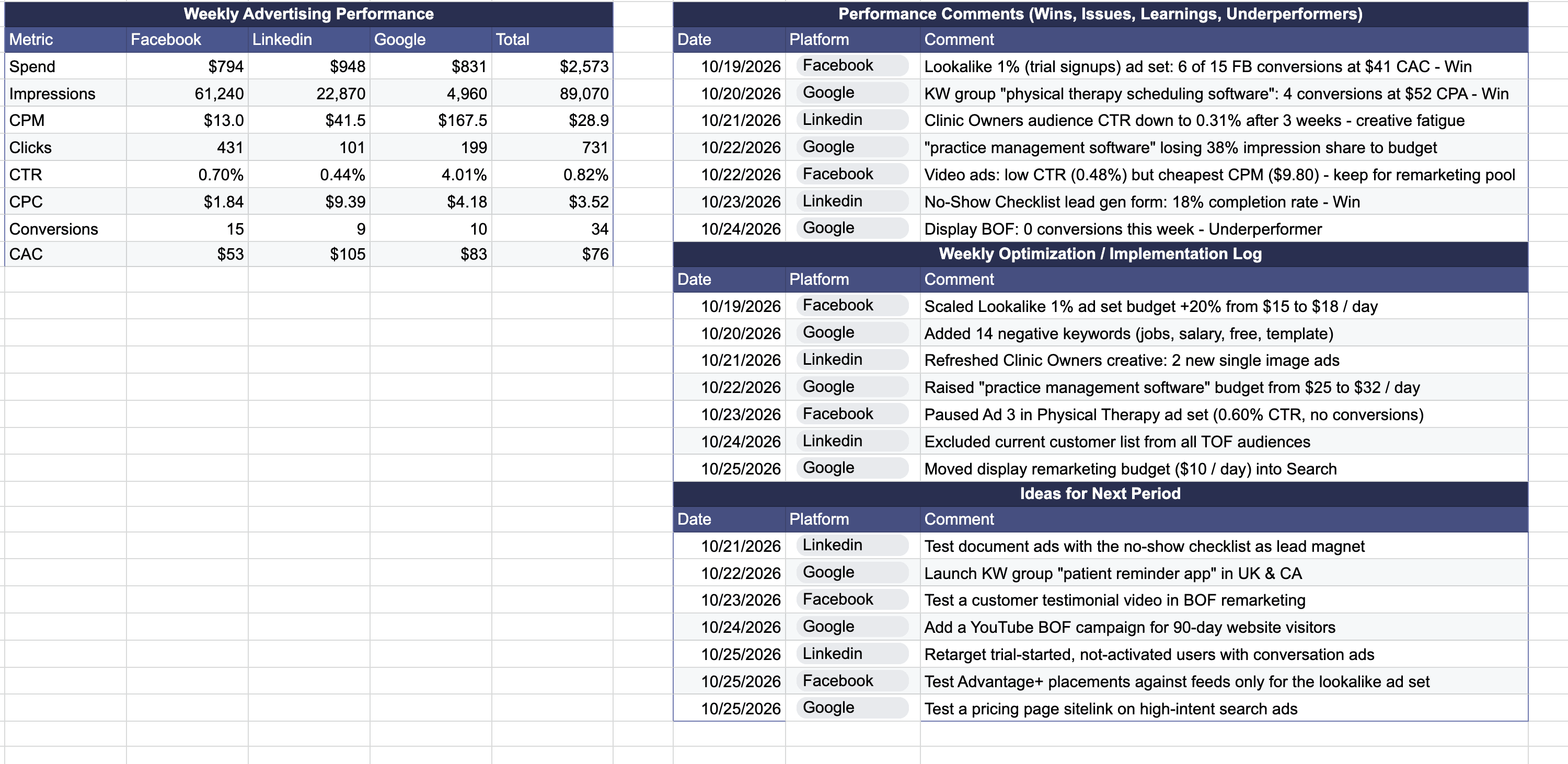
Weekly ad reviews go faster when the numbers and the notes sit together. This weekly ads performance report pairs a table for each platform with short logs, so each week ends with results, decisions and next steps in one place.

With this template, you can:

  • Track spend, impressions, CPM, clicks, CTR, CPC, conversions and CAC for each platform.
  • See totals across Facebook, LinkedIn and Google.
  • Note wins, issues, learnings and underperformers by date and platform.
  • Keep a log of the optimizations you made that week.
  • Collect ideas to test in the next period.

Benefits of Using Our Weekly Ads Performance Template

  • Spot which platform drives conversions at the lowest CAC.
  • Keep a record of budget changes, pauses and tests, so results are easy to explain later.
  • Turn weekly learnings into a list of next tests.
  • Give clients, founders or your team a consistent weekly update.
  • Build a history of what worked on each platform.

How to Use This Template

  1. Download the "Weekly Ads Performance Template".
  2. Enter the week's spend, impressions, clicks and conversions for each platform.
  3. Add CPM, CTR, CPC and CAC, and compare them across platforms.
  4. Log wins, issues and learnings with the date and platform.
  5. Record each change you made in the optimization log.
  6. Add ideas for the next period and review them at the start of the next week.

From Weekly Numbers to Next Steps

The performance table shows what happened. The logs record why it happened and what you plan to do about it.

The examples in the template show the level of detail to aim for. They include a search keyword marked as a win with its CPA, a retargeting budget scaled by 25% and new LinkedIn job titles to test.

To have an expert team run and report on your paid ads, explore our PPC services for SaaS or get started with our free growth marketing plan.

FAQ

What should a weekly ads performance report include?

A weekly ads performance report should show the same core metrics for every platform: spend, impressions, CPM, clicks, CTR, CPC, conversions and CAC, plus a total. Together they show what you spent, how many people saw and clicked your ads, and what each conversion cost.

Numbers alone rarely explain a week, so a good report also logs:

• Wins, issues, learnings and underperformers.
• Changes you made that week, such as budget shifts or paused keywords.
• Ideas to test in the next period.

The WeGrowth Weekly Ads Performance Report Template puts the table and all three logs on one sheet, with a date and platform on every log entry.

How do you calculate CPM, CTR, CPC and CAC for paid ads?

All four come from spend, impressions, clicks and conversions:

• CPM (cost per 1,000 impressions): spend divided by impressions, times 1,000.
• CTR (click-through rate): clicks divided by impressions.
• CPC (cost per click): spend divided by clicks.
• CAC (customer acquisition cost): spend divided by conversions.

For example, $437 in spend, 16,890 impressions, 174 clicks and 2 conversions gives a CPM of about $25.90, a CTR of 1.03%, a CPC of about $2.50 and a CAC of about $219.

If your conversion is a signup or trial and not a paying customer, call the metric cost per acquisition (CPA), so nobody reads it as full customer acquisition cost.

How do you compare Facebook, LinkedIn and Google ads?

Compare the same metrics for each platform side by side, over the same period, with a total across all of them. Weigh conversions and CAC more than CTR or CPC alone, since a platform with expensive clicks can still bring in the cheapest customers.

The Weekly Ads Performance Report Template gives Facebook, LinkedIn and Google their own column and adds a total column. Add a column for another platform, such as Reddit or Microsoft Ads, and include it in the total.

What should you write in weekly ad performance comments?

Write what explains the numbers: wins, issues, learnings and underperformers. Keep each comment to one observation, add the date and platform, and name the campaign, keyword or audience it refers to, so the note is specific enough to act on.

For example, a note that LinkedIn top-of-funnel campaigns are underperforming due to weak creative engagement, or a Google Search keyword marked as a win with its CPA. The Weekly Ads Performance Report Template has a dated log for these comments.

What is an ad optimization log?

An ad optimization log is a dated record of the changes you make to your campaigns, such as scaling a retargeting budget by 25% or pausing a keyword group with no conversions. Performance comments describe results. The optimization log records the actions behind them, so you can connect later results to specific changes.

The Weekly Ads Performance Report Template keeps three separate logs: performance comments, the optimization log and ideas for the next period. Keeping them apart also shows which ideas you have already tested.

How do you report weekly ad results to clients or leadership?

Use the same layout every week: one table of results by platform, then short notes on what changed and what comes next. A consistent format makes week-over-week changes easy to spot and builds a history of what worked on each platform.

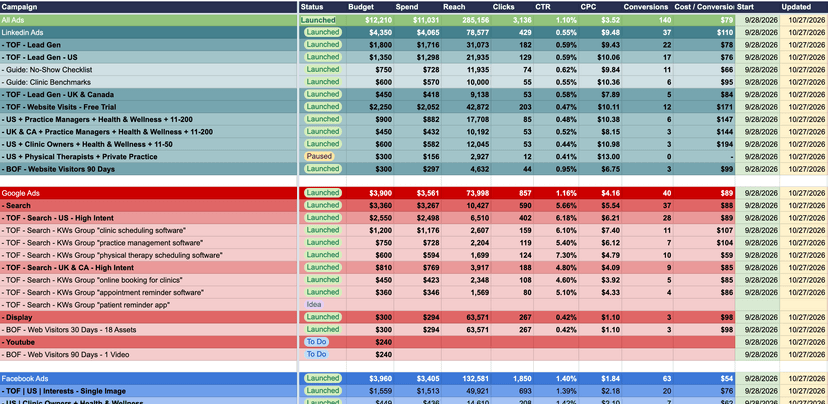
The Weekly Ads Performance Report Template follows this layout. To plan the campaign structure and budgets behind the report, use our Ad Campaign Planner Template.

Is the Weekly Ads Performance Report Template free?

Yes. WeGrowth's Weekly Ads Performance Report Template is free. It is a Google Sheet: make a copy to edit it in Google Sheets, or download your copy as an Excel file with File > Download > Microsoft Excel (.xlsx).

Let's Accelerate Your SaaS Growth

If you found this template helpful or need expert support across any aspect of your SaaS growth—strategy, analytics, conversion optimization, marketing, or more—we've got you covered.

Get Free Marketing Plan