Ad Campaign Planner Template

A planner for structuring paid media before launch. Map each campaign, ad set and ad by funnel stage, and get the budget approved up front. Then track status, spend and conversions at every level, and use your ratings to plan the next round.

Ad Campaign Planner Template for SaaS

About the Ad Campaign Planner Template

Paid campaigns get hard to manage once they span several platforms and audiences. This planner maps the full account structure before launch and keeps tracking it once ads go live.

With this template, you can:

  • Plan campaigns for LinkedIn Ads, Google Ads and Facebook Ads in one place.
  • Nest campaigns, ad sets and ads so the account structure is easy to follow.
  • Separate top-of-funnel and bottom-of-funnel campaigns.
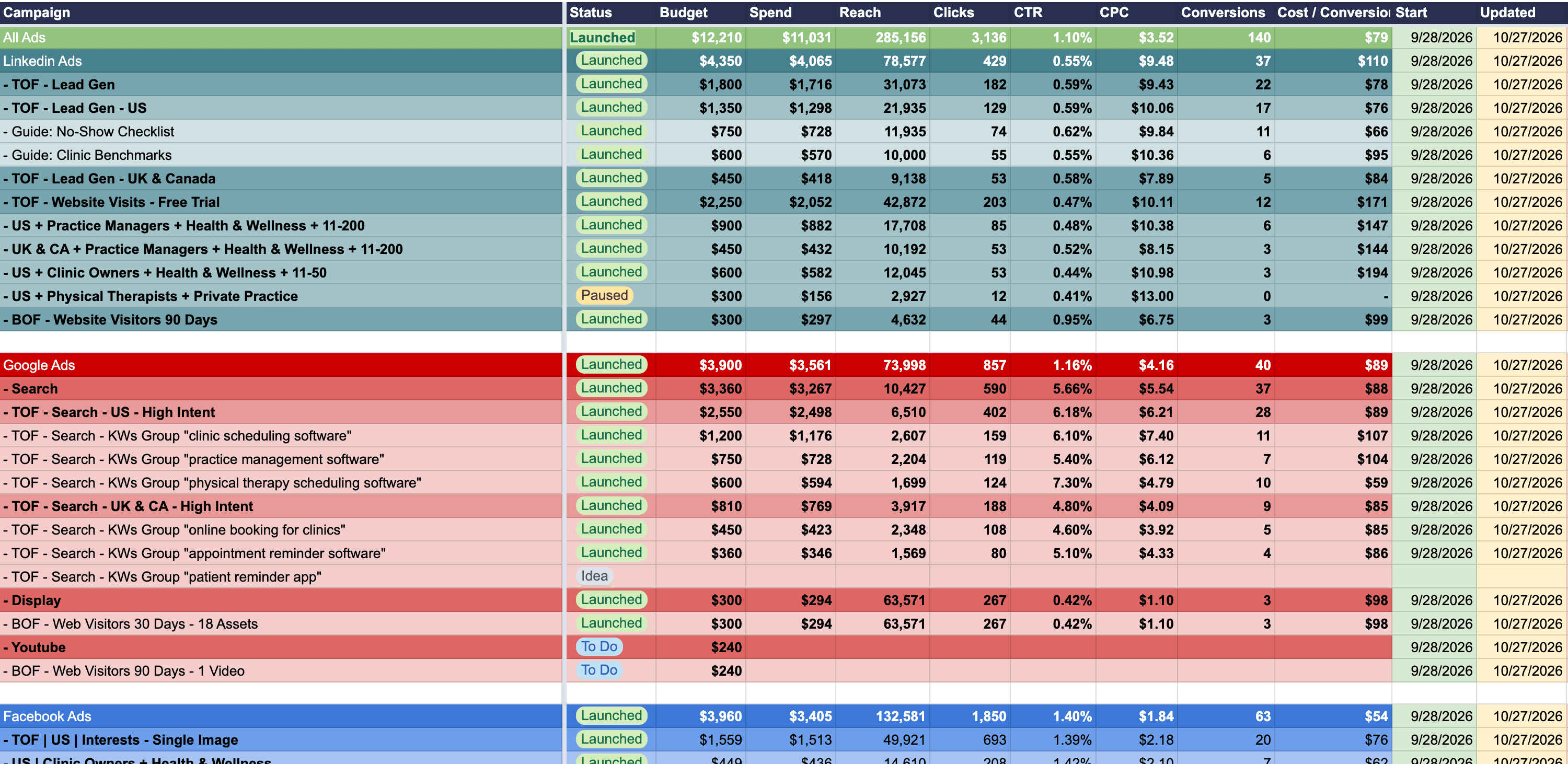
  • Track status, budget, spend, reach, clicks, CTR, CPC, conversions and cost per conversion.
  • Record start, update and end dates, and rate each campaign.

Benefits of Using Our Campaign Planner Template

  • Get budget and structure approved before anything goes live.
  • See each campaign and its status at a glance.
  • Compare results at the campaign, ad set and ad level.
  • Give your team one shared view of what is planned and what is running.
  • Start each new account from the same structure.

How to Use This Template

  1. Download the "Campaign Planner Template".
  2. Adjust the example structure to the platforms, audiences and funnel stages you plan to run.
  3. Name each campaign, ad set and ad, and set its budget.
  4. Update the status as each item moves forward.
  5. Fill in spend, clicks, conversions and cost per conversion as results come in.
  6. Rate each campaign and use the ratings to plan the next round.

A Starting Structure for Each Platform

The planner comes with an example setup. On LinkedIn, it covers lead gen campaigns, top-of-funnel campaigns aimed at the main conversion and bottom-of-funnel campaigns for website visitors.

On Google, it covers search campaigns by keyword group, plus display and YouTube campaigns for website visitors. Facebook campaigns follow a campaign, ad set and ad layout you can expand.

To plan, launch and optimize your paid campaigns with an expert team, explore our PPC services for SaaS or get started with our free growth marketing plan.

FAQ

How should you structure SaaS ad campaigns?

Nest everything in three levels: campaign, ad set and ad. Split campaigns by funnel stage, so budgets and results for new audiences stay separate from retargeting. Then give each ad set one audience or keyword group, so you can see which one drives results.

The Ad Campaign Planner Template's example setup, by platform:

• LinkedIn: lead gen and website visit campaigns, plus BOF retargeting.
• LinkedIn ad sets: targeted by persona job title, company size and industry.
• Google: search campaigns by keyword group, plus display and YouTube retargeting.
• Facebook: several campaigns, each with four ad sets and three ads per ad set.

What do TOF and BOF mean in paid advertising?

TOF means top of funnel and BOF means bottom of funnel. TOF campaigns reach people who do not know you yet. BOF campaigns target people who already visited your website, so they already know your product.

Typical TOF campaigns target new audiences by job title, company size, industry or search keyword. Typical BOF campaigns retarget website visitors with display, video or social ads.

Keep the two apart. Retargeting audiences are smaller and warmer, so their results are not a fair benchmark for campaigns that reach new audiences. The Ad Campaign Planner Template splits its LinkedIn and Google examples into TOF and BOF campaigns.

Which metrics should an ad campaign planner track?

An ad campaign planner should track status, budget, spend, reach, clicks, CTR, CPC, conversions and cost per conversion for every campaign, ad set and ad, plus start, updated and end dates.

Keep the rows nested, so you can compare results at each level. You can then see whether one ad set drives most of a campaign's conversions, or whether one ad pulls down the results of its ad set. The Ad Campaign Planner Template also adds a rating for each campaign.

How do you build a paid media plan before launch?

Lay out the campaign names, structure and budgets first, with every item marked as to do, and share the plan for sign-off before anything goes live. Reviewers should see every platform, funnel stage and budget in one place.

Once ads run, fill in spend and results and update the status as each item moves forward. The same sheet then works as both the plan and the tracker. The Ad Campaign Planner Template is built for this, with a rating per campaign to help plan the next round.

Should you separate Google search, display and YouTube ads?

Yes. Search, display and YouTube reach people at different moments. Search catches people looking for a solution right now, while display and YouTube are often used to retarget people who already visited your site. Mixing them in one campaign blurs budgets and results.

The Ad Campaign Planner Template gives each Google campaign type its own rows, next to LinkedIn and Facebook. Add or remove rows to match the platforms you use.

How does an ad campaign planner differ from an ads report?

An ad campaign planner maps your campaign structure and tracks results per campaign, ad set and ad. It answers what you are running, where and with what budget.

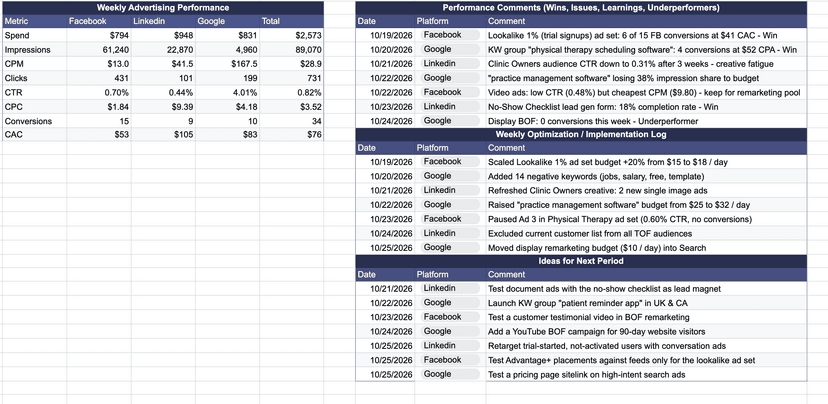
A weekly ads report is for the weekly review. It shows platform totals for spend, CPM, CTR, CPC and CAC, plus notes on wins, changes and next tests. Use a planner to set up and track campaigns, and a weekly report to explain each week's results.

Is the Ad Campaign Planner Template free?

Yes. WeGrowth's Ad Campaign Planner Template is free. It is a Google Sheet: make a copy to edit it in Google Sheets, or download your copy as an Excel file with File > Download > Microsoft Excel (.xlsx).

Let's Accelerate Your SaaS Growth

If you found this template helpful or need expert support across any aspect of your SaaS growth—strategy, analytics, conversion optimization, marketing, or more—we've got you covered.

Get Free Marketing Plan